How AI voice transcription actually works (and why it still makes mistakes)
A plain-English breakdown of speech-to-text AI, the difference between cloud and on-device transcription, and when accuracy falls apart.
Published · Updated · 1201 words · 7 min read · By Prashant
I've watched people get genuinely angry at transcription AI. They record something perfectly clear, play it back and hear every word, then read the transcript and find the AI turned "strategic partnership" into "strategic partner ship." The audio was fine. The AI wasn't.
Understanding why helps. Not because you need to debug the neural network. Because it tells you when to trust the output and when to double-check.
Quick answer: Speech-to-text turns sound into phonemes, then predicts the most likely word sequence. Accuracy drops with noise, accents, rare words, and overlapping speech. Cloud models are more accurate and cover more languages. On-device models are more private and work offline.
The basic idea: sound waves to probabilities
At a high level, speech-to-text AI does two things. First, it turns sound waves into smaller pieces. Not words. Pieces of sound called phonemes, each maybe a twentieth of a second long. Second, it runs those pieces through a model that predicts which words they most likely represent.
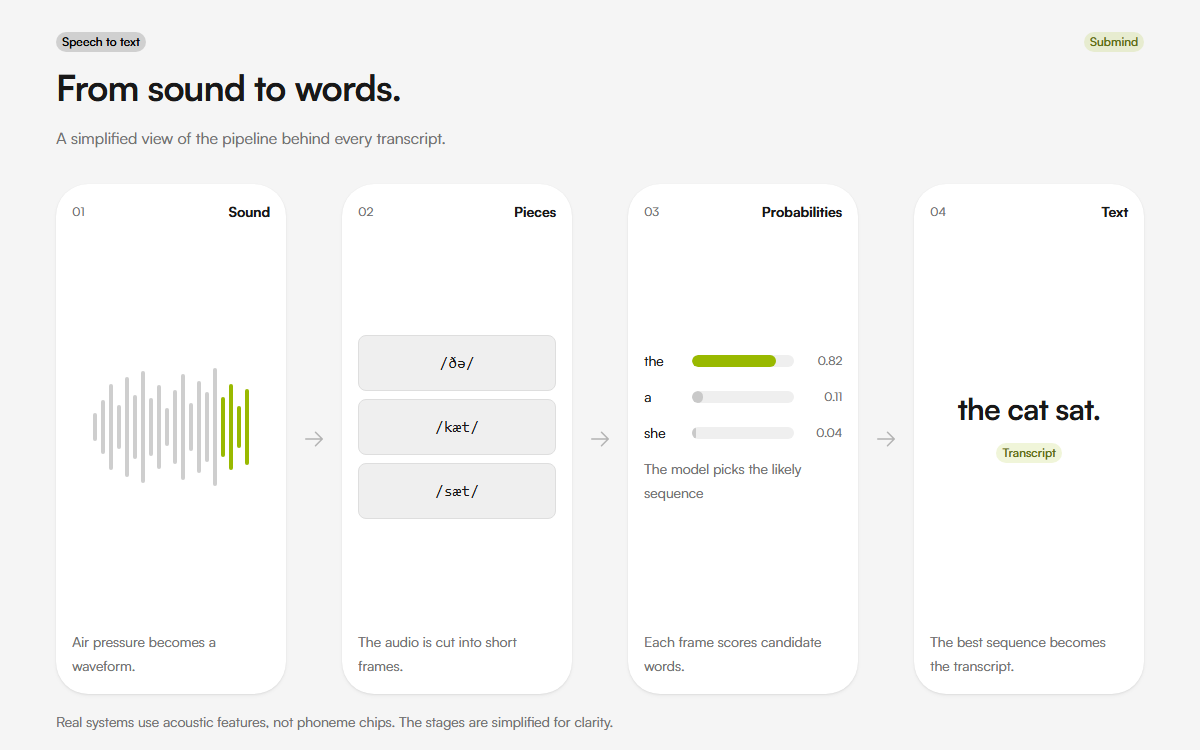
The model doesn't hear words. It sees a sequence of acoustic features and calculates probabilities. Given these sounds, what's the most likely sequence of English words? It's doing math on waveforms, not listening the way you listen. The most widely used open-source example is OpenAI's Whisper.
This is why transcription AI is simultaneously impressive and unreliable. It can transcribe a conversation in 70+ languages with better accuracy than a human in ideal conditions. Then it confidently turns "I need to buy apples" into "I need to buy a pulse" because the acoustic signal was ambiguous and the probability model tilted the wrong way.
Why identical audio can produce different transcripts
Two transcription engines can process the same audio and produce different output. They use different models trained on different data. Google's model might handle Australian accents better. Deepgram's might handle noisy environments better. AssemblyAI might be better at proper nouns.
This is also why you can't just say "AI transcription is X percent accurate." Accuracy depends on the engine, the language, the accent, the background noise, the microphone quality, and whether the speaker is reading a script or talking naturally. Drop any of those variables and the number changes.
In practice, most modern engines claim 90 to 95 percent word accuracy on clean English audio. Real-world accuracy, with background noise and casual speech, is lower. For non-English languages, it depends heavily on how much training data exists for that language.
Cloud transcription vs on-device transcription
Cloud transcription sends your audio to a server, processes it with powerful models, and sends back text. It's more accurate because it can use larger models. It also means your audio leaves your device.
On-device transcription keeps everything local. It's private. It works offline. It's faster because there's no upload step. But the models are smaller, which means they're less accurate, particularly for accents and noisy environments.
Submind transcribes in the cloud. That's what lets it cover 70+ languages, identify speakers, and handle hour-long recordings. It also means your audio leaves your device, which is why the privacy commitments matter: encrypted in transit and at rest, and never used for training.
That is the Submind app. Submind's free browser tools, the voice recorder and the audio to text transcriber, work the opposite way. An open-source on-device speech model (Whistle, Apache-2.0) runs in WebAssembly inside the tab and covers seven languages with auto-detect. The audio never leaves the device, and the model (about 17 MB) is cached after the first run, so later transcriptions work offline. Same product family, two different privacy trade-offs: the app buys language coverage with the cloud. The free tools buy complete privacy with a smaller language set.
What actually causes errors
Background noise confuses the acoustic model. A car horn. A keyboard clack. A second person talking nearby. The model tries to interpret every sound as speech because that's what it's designed to do.
Accents and dialects matter more than most people realize. Models are trained on datasets that don't equally represent every accent. If most of the training data is American English, Scottish English will have worse accuracy. Indian English, worse still. This is improving but it's not solved.
Homophones are a persistent problem. "Their" and "there." "Two," "to," and "too." The model guesses based on context but gets it wrong often enough to be annoying. Names are even worse. "Carrie" becomes "carry." "Dweck" becomes "dweeb."
Rare words and domain-specific vocabulary trip up every system. If you're a biologist talking about "allosteric regulation," the model has probably never seen that phrase. It'll guess something phonetically similar. That's why some tools let you add custom vocabulary. Tell the model "these words exist and I might say them" and accuracy improves significantly.
How speaker identification works (and when it fails)
Speaker identification, or diarization, is the task of labeling who said what. It doesn't know who the speakers are. It just knows "speaker A spoke, then speaker B, then speaker A again."
The system analyzes voice characteristics: pitch, cadence, timbre. It clusters similar voices together. In a two-person conversation with different-sounding voices, it works well. In a five-person meeting where two people sound similar, it falls apart. In a recording with overlapping speech, it gets confused entirely.
Some tools let you name the speakers manually. Others try to match voiceprints to known speakers. Most of the time, you'll get "Speaker 1" and "Speaker 2" labels, which is usually enough to follow the conversation.
What this means for your workflow
Transcription AI is good enough to be useful and unreliable enough to require checking. The sweet spot is using it for things where minor errors don't matter: personal notes, meeting summaries, creative brainstorming. For things where accuracy is critical (legal documents, medical records, anything client-facing), either review the transcript or use a human transcription service.
Don't trust it blindly. But don't dismiss it either. It saves more time than it costs, as long as you know what you're getting.
If you want to see the difference between on-device and cloud transcription in practice, try the free live transcription tool. The main app's cloud pipeline is described on Submind AI.
Related reading
Sources
FAQ
How does AI transcription work?
It turns sound waves into small phoneme-like units, then predicts the most likely word sequence from those acoustic features.
Why are transcripts wrong?
Noise, accents, rare words, homophones, and overlapping speech all make the acoustic signal ambiguous. The model guesses, and sometimes it guesses wrong.
Is on-device transcription less accurate?
Usually yes, especially for accents and noisy audio. The models are smaller. The trade-off buys privacy and offline use.
Does Submind use cloud or on-device transcription?
The Submind app uses cloud transcription for language coverage and long recordings. The free browser tools use an on-device model and cover seven languages.
About the author
Prashant is the founder of Submind. He writes about voice notes, transcription, and turning spoken thoughts into structured notes.
Read the full story