The AI workbench: run data analysis on your voice notes
What if your AI assistant could run Python, generate charts, and analyze data from your connected tools? The workbench turns voice notes into real computation.
Published · Updated · 1249 words · 7 min read · By Prashant
Here's something I didn't expect to say: I asked my note-taking app to generate a chart of my meeting topics over the last month, broken down by category, and it did it. In Python. Without me writing a single line of code.
This is the workbench. It's a secure Python sandbox that the AI can use to run analysis on your behalf. And it changes what "notes" can do.
Quick answer: The AI workbench is a sandboxed Python environment inside Submind AI. It can pull data from connected tools, run pandas and matplotlib, and return a chart or file in one request. Use it for multi-step analysis. Use a direct action for a single send, create, or fetch.
What the workbench actually is
Most AI tools can do exactly one thing at a time. Ask a question. Get an answer. Execute a command. Get a result. If you want to fetch data, process it, chart it, and export it, you need four separate interactions, each one starting from scratch.
The workbench collapses this into a single interaction. You tell the AI what you want. It writes a Python script. The script runs in a sandboxed environment with access to your connected services. It can pull data from your email, cross-reference it with your calendar, analyze it with numpy, chart it with matplotlib, and export the results as a file. All in one go.
The sandbox has limits. Each script gets three minutes to run. It has access to common data science libraries (pandas, numpy, matplotlib, Pillow). It can call tools on your behalf (fetch emails, search calendar, query databases). But it can't access the internet directly, can't install arbitrary packages, and can't persist data between sessions. These limits are intentional. They make the environment predictable and safe.
Advertisement
What you can actually use this for
The practical applications are more interesting than the technical description. Here are a few things people are actually doing:
Analyzing meeting patterns across weeks. "Pull my last month of meeting notes. Count how many meetings I had per week. Chart it. Show me which days of the week are busiest." The workbench fetches the notes, parses the dates, counts by day, and returns a bar chart in about fifteen seconds.
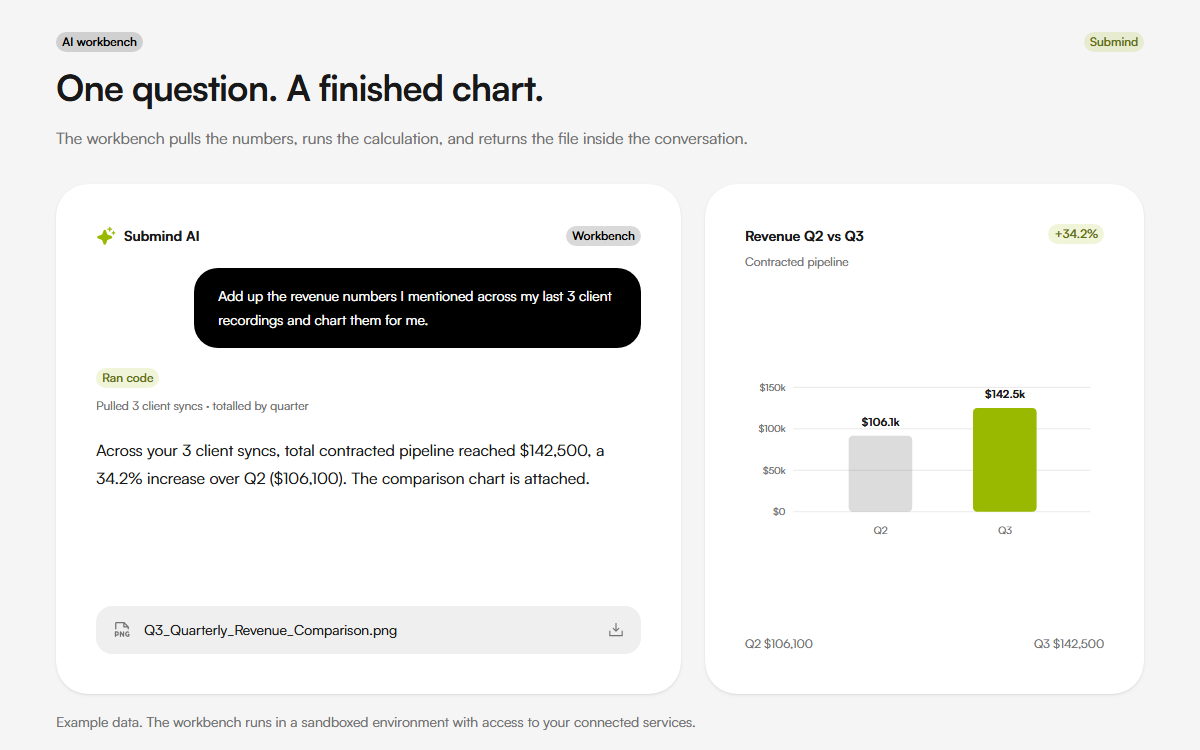
Comparing project velocity. "Get the tickets completed from Linear for the last three sprints. Calculate average completion time per sprint. Chart the trend." This would normally require exporting CSV files, opening Excel, writing formulas, and creating a chart. The workbench does it in one sentence.
Generating client reports. "Pull all my voice notes tagged with 'client X' from the last quarter. Summarize key decisions and action items. Export as a CSV I can share." The workbench searches your notes, extracts the relevant ones, and packages them into a structured file.
Cross-referencing across services. "Find all emails from vendors this month that mention pricing changes. Compare their new prices against our budget spreadsheet. Flag anything over budget." This touches email and documents in one workflow. Doing this manually would take an hour of tab-switching.
Bulk operations. "Take all my voice notes from last month that don't have tags and tag them based on their content." The workbench processes each note, analyzes its transcript, and assigns appropriate tags. Fifty notes, tagged in seconds.
When to use the workbench vs simple actions
The workbench isn't the right tool for everything. Sending a single email is overkill in the workbench when a simple action call works fine. The workbench exists for multi-step operations where data needs processing between steps.
A good rule of thumb: if you can describe what you want in a single action verb (send, create, fetch, update), use a direct action. If your request involves words like "analyze," "compare," "chart," "convert," "summarize across," or "bulk," use the workbench.
The workbench also helps when you're not sure exactly what you're looking for. "Show me anything unusual about my meeting patterns this month" is a vague request. The workbench can explore the data, try different analyses, and surface what's interesting. Direct actions need specific instructions.
The limits you'll hit
The workbench isn't magic. It runs Python. Python can do a lot but not everything.
Processing large amounts of data is slow in the sandbox. A thousand voice notes with full transcripts is a lot of text. The workbench might time out trying to analyze all of them. For bulk operations on large datasets, you need to specify filters or accept that it will take multiple sessions.
Chart quality varies. Matplotlib charts are functional but not beautiful. If you need presentation-quality visuals, you'll want to take the data the workbench produces and chart it in a proper design tool.
The AI writes the Python, and sometimes the Python is wrong. An import is missing. A column name is slightly off. The logic doesn't quite match what you asked for. The workbench typically catches these errors and retries, but it might take two or three attempts to get complex analyses right.
Privacy is not absolute in the workbench. The sandbox runs on a secure server, not on your device. If you're having it analyze sensitive data, that data is being processed in the cloud, not locally. The sandbox is isolated and the data is deleted after execution, but if your use case requires zero data leaving your device, the workbench isn't the right tool.
What makes this different from "just using ChatGPT"
You can paste data into ChatGPT and ask it to write Python. The difference is integration. The workbench has authenticated access to your tools. It doesn't need you to export data, paste it in, and copy-paste results back. It reaches into your email, your calendar, your notes, and your project tracker directly.
This integration is what makes it feel like an assistant rather than a code-writing tool. You don't have to prepare the data. You just ask the question and the system handles the rest.
It's still early. The workbench makes mistakes. The Python it writes sometimes needs correction. But the direction is clear. "Notes" are becoming "data." And data can be analyzed, visualized, and acted on in ways that text on a page never could.
The workbench is part of Submind AI. If you want to try the input side first, record a note with the free voice recorder or upload a file to the audio to text tool.
Related reading
- Beyond note-taking: how AI can now act on your voice notes
- What if your AI remembered everything you told it?
Sources
FAQ
What is the AI workbench?
It is a secure Python sandbox inside Submind AI. It runs code against your connected tools and returns a result, chart, or file.
When should I use the workbench?
Use it when a request has multiple steps, such as fetch, analyze, chart, and export. Use a direct action for a single step.
Can it run any Python package?
No. It includes pandas, numpy, matplotlib, and Pillow. It cannot install arbitrary packages or access the internet directly.
Does my data leave my device?
Yes. The sandbox runs on a secure server, so sensitive data is processed in the cloud. The sandbox is isolated and data is deleted after execution.
About the author
Prashant is the founder of Submind. He writes about voice notes, transcription, and turning spoken thoughts into structured notes.
Read the full story