Best voice note apps in 2026: a practical comparison
I tested six voice note apps across accuracy, AI features, pricing, and privacy. Here is what I found and which one makes sense for your situation.
Published · Updated · 1432 words · 8 min read · By Prashant
I have been using voice note apps for about three years. I have tried most of them. Some I kept. Some I deleted after a week. Some I wanted to like but could not justify.
This is not a "best overall" list. The right app depends on what you are trying to do. Someone recording daily journal entries needs something different from someone running interviews for a podcast. Here is what I found.
Prices and plan limits were checked in October 2026. They change often, so use the links below before you buy.
Quick answer: If you want AI-organized notes, pick Submind. If you need free basic transcription on iPhone, use Apple Voice Memos. For live meeting notes, try Otter. For private offline Mac transcription, choose MacWhisper. For occasional human-level accuracy, pay for Rev.
What I compared
I looked at six criteria. Transcription accuracy came first because if the text is wrong, nothing else matters. Then AI features: summarization, action item extraction, search. Then price, because subscriptions add up. Then platform support, because switching phones should not mean losing your data. Then privacy, because some of this stuff is personal. Then the overall feel: how fast the app opens, whether the interface makes sense, whether I actually wanted to use it.
I tested with the same three recordings: a quiet room monologue, a two-person conversation in a cafe, and a rapid-fire brainstorm where I talked faster than normal. Each app got the same files.
The six apps
Submind does transcription plus AI processing. You record, it transcribes, then the AI turns your rambling into structured notes with summaries and action items. Transcription runs in the cloud and covers 70+ languages, so non-English recordings work too. The voice note to structured note pipeline is the main draw. If all you want is plain transcription, there are cheaper options. If you want the AI to organize your thoughts for you, this is where it stands out. The free plan covers 5 min per note and 90 min a month. Premium raises that to 1-hour sessions and 1,500 minutes. Check the app for the current limits.
Otter.ai is the most established name in this space. Real-time transcription during meetings. Good for live collaboration. The transcript appears while people are still talking. Speaker identification works well in small groups. The free tier caps at 300 monthly minutes with 30 minutes per conversation. Pro is $16.99 per month, according to Otter's pricing page. The AI chat feature that lets you ask questions about your transcripts is useful, though it occasionally hallucinates answers. The main downside is that everything goes through Otter's servers. There is no offline mode and no on-device option.
Apple Voice Memos comes free with every iPhone. The iOS 18 update added transcription. It works offline. The transcription quality is decent for a free built-in app but noticeably worse than dedicated tools, especially with accents and background noise. There are no AI features. No summarization. No search across recordings. No speaker labels. You get a transcript and a recording and that is it. Good enough if you record occasionally and do not need anything beyond basic text. Not enough if you record daily and need to find things later.
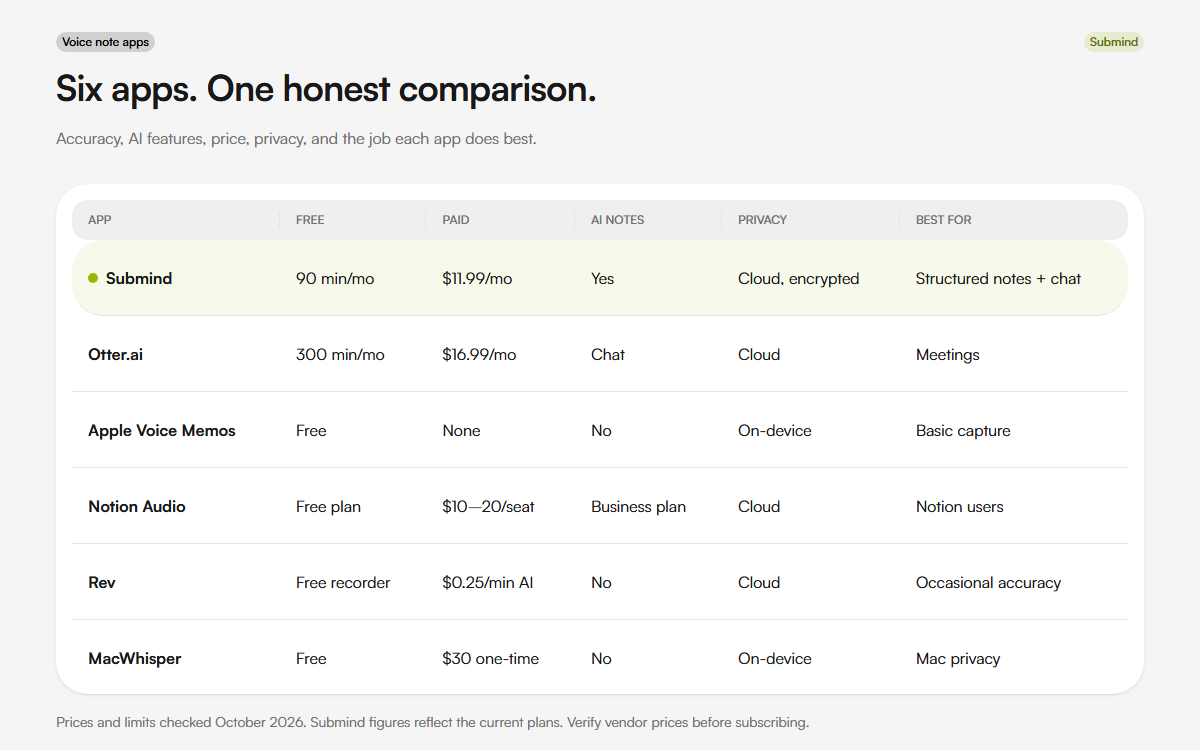
Notion Audio is Notion's voice-to-database feature. You record inside Notion, it transcribes, and drops the result into a Notion page. If you already live in Notion, the integration is seamless. The transcription is handled through Notion AI, which uses large models and produces accurate output. The catch is that it only works inside Notion. You cannot export just the transcript easily. You cannot use it as a standalone voice recorder. Notion AI is no longer a separate $10 add-on. Notion's pricing lists Plus at $10 per seat per month with a limited AI trial, and Business at $20 per seat per month with Notion AI credits. If you already pay for Business, the voice feature is part of the plan you have.
Rev Voice Recorder is Rev's free recording app that feeds into their paid transcription service. The app itself is basic: record, name the file, send to transcription. The transcription is done by Rev's AI engine or by humans, depending on what you pay for. AI transcription is $0.25 per minute. Human transcription is $1.50 per minute, according to Rev's pricing page. The quality is high, especially the human option. But the per-minute pricing means heavy users will pay significantly more than a subscription app. Good for occasional high-accuracy needs. Bad for daily capture.
MacWhisper is a Mac app built on OpenAI's Whisper model. It runs entirely on your device. No internet connection needed. No account required. You download it, you pick a Whisper model size, and it transcribes. The larger models are more accurate but slower. On an M1 MacBook Air, the medium model transcribes roughly at real-time speed. The large model takes about twice as long as the audio duration. The Pro version is a one-time $30 purchase, according to MacWhisper. No AI summarization. No speaker diarization. No mobile app. But the privacy story is the best of any option here, and the per-file cost is zero after the initial purchase.
Which one should you pick
If you want AI to organize your voice notes into structured output and action items, Submind and Otter are your main options. Submind keeps your audio encrypted and never trains on it. Otter gives you real-time collaboration.
If you just need basic transcription and already have an iPhone, start with Apple Voice Memos. It is free. It works. Upgrade when you outgrow it.
If you live in Notion and want voice input that lands directly in your workspace, Notion Audio is the obvious choice. Just know you are locked into the Notion ecosystem.
If you need the highest possible accuracy for occasional recordings and are willing to pay per minute, Rev's human transcription is unmatched. Nobody beats a real person listening to the audio.
If you want maximum privacy and do not mind doing your own organization, MacWhisper gives you unlimited offline transcription for a one-time payment. Pair it with whatever note-taking system you already use.
What I actually use
I switch between two apps depending on what I am doing. For quick captures throughout the day, I use whichever app opens fastest and gets out of my way. For anything that needs structure, summaries, or action items, I use an AI-powered option because manually organizing fifty voice notes at the end of the week is not something I will actually do.
Most people I have talked to about this do not need more features. They need less friction. The app that wins is the one you actually open when the idea arrives.
If you want to test the capture side before you choose a paid app, the free voice recorder and audio to text tool run in your browser. The live transcription tool handles real-time speech. No account is needed.
Related reading
- Why I built a voice notes app instead of using the one on my phone
- Why on-device transcription matters for your privacy
Sources
FAQ
Which voice note app is best for AI notes?
Submind is the strongest fit if you want structured notes, summaries, action items, and chat with your recordings. Otter is the better fit if your main use is live meetings.
Is Apple Voice Memos enough?
It is enough for basic iPhone capture and offline transcription. It has no AI summaries, speaker labels, or search across recordings.
Which app is best for privacy?
MacWhisper keeps audio on your Mac. Apple Voice Memos transcribes on-device. Submind uses encrypted cloud sync and does not train on your audio, but the audio does leave your device.
Do any of these apps work offline?
Apple Voice Memos and MacWhisper work offline. Submind's free browser tools run on-device in your browser. The Submind app uses cloud transcription.
About the author
Prashant is the founder of Submind. He writes about voice notes, transcription, and turning spoken thoughts into structured notes.
Read the full story